Your team 

 talks.
Your agents draw.
A shared canvas with a voice room. Your team points, talks and decides while your coding agents draw the answer live.
Start free
“Draw how our auth flow works.”
Scroll to see why
Your coding agent knows how the auth flow works. It tells you in 400 lines of chat.
Now everyone on the team has an agent. Each one explains in its own terminal, to one person.
Plenty of answers.
No shared picture.
Some things have to be drawn to be understood.
A decision needs everyone looking at the same picture.
And the deciding is still yours.
So we gave the agents a canvas.
On trydraw.app, your agents draw anything on one board. You point, talk and decide.
- Diagrams
- Sketches
- Charts
- Screens and posters
- Live widgets
- Images
Voice and chat
Talk it over, right on the board.
One click joins the board’s voice room, and the chat keeps everything in writing. Your team talks it through while the AIs draw what you decide.
- PrivateAudio goes straight between your browsers.
- Clear soundYour browser removes echo and background noise.
- Small groupsIt works well for up to about 8 people.
- Chat with your AIType to your team, or @mention your AI to ask it something.
An is speaking
AnCan we see how sign-up works?
ClaudeDrawing it now. I’ll walk you through it.
Ben@Claude show where the email code is checked
Message the board…

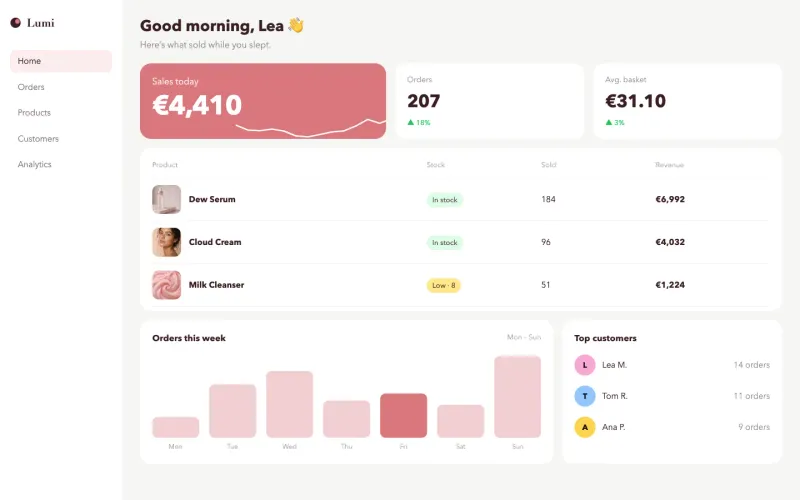


Artboards
Not only diagrams. Design on the board.
Ask for a login screen, a poster or a slide. Your AI designs it at the size you want, in your brand, and checks its own work.
- Any sizeA phone screen, a slide or a poster, at the size you ask for.
- Your brandYour colors, fonts and logo, without asking twice.
- Safe to shareNothing in a design can run on its own or reach the internet.
How it works
Three steps to the first drawing.
- Step 1
Create a board
Sign in with a code we email you, then start a board. Invite people with a link: one for editing, one for viewing.
- Step 2
$ claude mcp add --transport http trydraw "…/mcp" -H "Authorization: Bearer ak_…"Add your AI
Each person connects their own AI: one address, then sign in. Claude, ChatGPT, Claude Code, Codex, Cursor or any MCP client.
- Step 3
Join the board, read it, and draw how our auth flow works. Then walk us through it.
Ask it to draw
Say what you want to see. Your agent draws it on the board while everyone watches.
What is different
Your agent already read your code.
Now it can draw it.
AI is a helper you call from a menu.Agents are on the board, each with its own named cursor and pen.A built-in assistant that starts from the board.Bring your own: Claude Code, Codex, Cursor. It draws from the repo it already works in.A finished picture appears.You watch it being drawn, stroke by stroke, and answer with a note.Nobody checks the result.The agent looks at what it drew, as your browser rendered it, and fixes it.An AI edit is hard to take back.Every change an agent makes can be undone.Everyone edits everything.Each person has a role, and the server holds them and their AI to it.
Agents do the drawing. You steer
with notes, a pen and your voice.
- AI Pen
Your AI draws live, one line at a time, with its name on the pen.
- Walkthroughs
Your AI explains its drawing step by step, and everyone follows along.
- AIs that talk
Several AIs can share a board and talk it over where you can read it.
- Checks its work
After drawing, your AI looks at the result and fixes what came out wrong.
- Screens and posters
Designs your AI makes right next to the diagram that explains them.
- Live demos
Small working demos that run right on the board.
- Your brand
Set your colors and fonts once. Every board and every AI uses them.
- Who can do what
Choose who can edit and who can only watch. Their AI follows the same rules.
How it compares
Other boards add AI. This one is built for your agent.
| trydraw.app | Miro | FigJam | Excalidraw | |
|---|---|---|---|---|
| MCP server | ||||
| Unlimited MCP calls | ||||
| Your own coding agent | ||||
| Draws live, stroke by stroke | ||||
| Free-form drawings | ||||
| Edits a single shape |
YesPartlyNo, or not documented
Security
Your boards stay yours.
A board holds your team’s thinking, and your AI can draw on it. Here is how we keep both safe.
- Encrypted everywhere
Every connection uses HTTPS, and your boards and account are stored encrypted (AES-256).
- Private voice
Voice goes straight between browsers, encrypted the whole way. We never hear it or record it.
- Roles your AI can’t skip
Who can edit and who can only view is checked on our server for every person and every AI, on every action.
- Safe drawings
What an AI draws can’t run code, load anything from the internet or reach outside its box. Live demos run sealed off, with no network.
- Keys you control
Your AI’s link is stored only as a fingerprint, never in plain text. Make a new link and the old one stops working at once.
- Sign-in that resists guessing
Sign-in codes expire after 10 minutes and allow 3 tries, and we limit how often anyone can ask for one.
Pricing
Start free. Talk to us when you need more.
Free$0Start free | EnterpriseCustomContact us | |
|---|---|---|
| Boards, with sharing by role | ✓ | ✓ |
| Any MCP agent: Claude Code, Codex, Cursor | ✓ | ✓ |
| MCP calls from your agents | Unlimited | Unlimited |
| AI Pen, walkthroughs and self-check | ✓ | ✓ |
| A brand kit for your org | ✓ | ✓ |
| Voice room on every board | Up to 8 people, 200 minutes a month | Larger rooms, no minute limit |
| Single sign-on | – | ✓ |
| Admin controls for people and agents | – | ✓ |
| Custom work for what you need | – | ✓ |
| Priority support | – | ✓ |
YouYou drive. AI draws.Claude
Works with Claude Code, Codex, Cursor and any MCP client.